
Reporting taxes is an essential cornerstone of compliance. In the United States, all businesses must report their contractor fees as miscellaneous expenditures via tax forms. While the 1099 forms specify the amount you compensate to the independent contractor, you must include another form in tandem.
Form 1096 is also a taxation form that businesses submit with their information returns. It accompanies numerous other forms, including W-2G, 1097, 1098, 1099, 3921, 3922, and 5498. As a business owner, you must know about the importance of Form 1096, how to obtain it, and the filing process. This guide addresses these concerns extensively and offers tips to streamline your tax processes.
What is IRS Form 1096?
The IRS Form 1096 is officially called the Annual Summary and Transmittal of U.S. Information Returns. As the name signifies, this form provides a summary of all the accompanying documents, that include forms W-2G, 1097, 1098, 1099, 3921, 3922, and 5498.
Form 1096 is submitted with the remaining tax return forms only when the taxpayer files them via mail. Hence, you can consider Form 1096 as a fax cover sheet. It provides a glance at all the forms inside the package so the official personnel can forward them to the appropriate department.
Form 1096 vs. 1099 form?
The names of the two forms are very close, so are they similar? Absolutely not. In fact, the two forms are polarising in their purposes.
Form 1099 records all the payments (above USD 600) a business has made to its contractors. After collaborating with the contractors, businesses issue them a 1099 form and retain a copy to submit to the IRS. This copy is sent in tandem with Form 1096, which summarizes the details of form 1099. Check out this blog to better understand the scope and relevance of Form 1099.
Now that you have a good idea about Form 1096, let’s discuss how to obtain, file, and submit the form.
Where can I get a 1096 form?
Getting a Form 1096 is very convenient, as explained in the steps below:
- Visit the website www.IRS.gov/orderforms to order Form 1096
- Click on “Online Ordering for Information Returns” and enter the amount of 1096s you want the IRS to mail you
- Select “Add to Cart” to add the forms to your order
- Select “View Cart” for an overview of the order, and then go to “Checkout” to complete the order
Remember that the IRS provides these forms free of cost, and it typically takes ten business days to deliver them. Furthermore, the form must be scannable; only the IRS website provides the official forms suitable to the processes. If you print and mail the form, the IRS will not be able to scan the receipt, and you’ll end up paying the penalty.
However, a few low-volume returns can be submitted with the printed-PDF Form 1096: 1097-BTC, 1098-C, 1098-MA, 1098-Q, 1099-CAP, 1099-H, 1099-LTC, 1099-Q, 1099-QA, 1099-SA, 3921, 5498-ESA, 5498-QA, and 5498-SA.
Once you have received your 1096s, it is time to fill them.
Instructions To Fill Form 1096
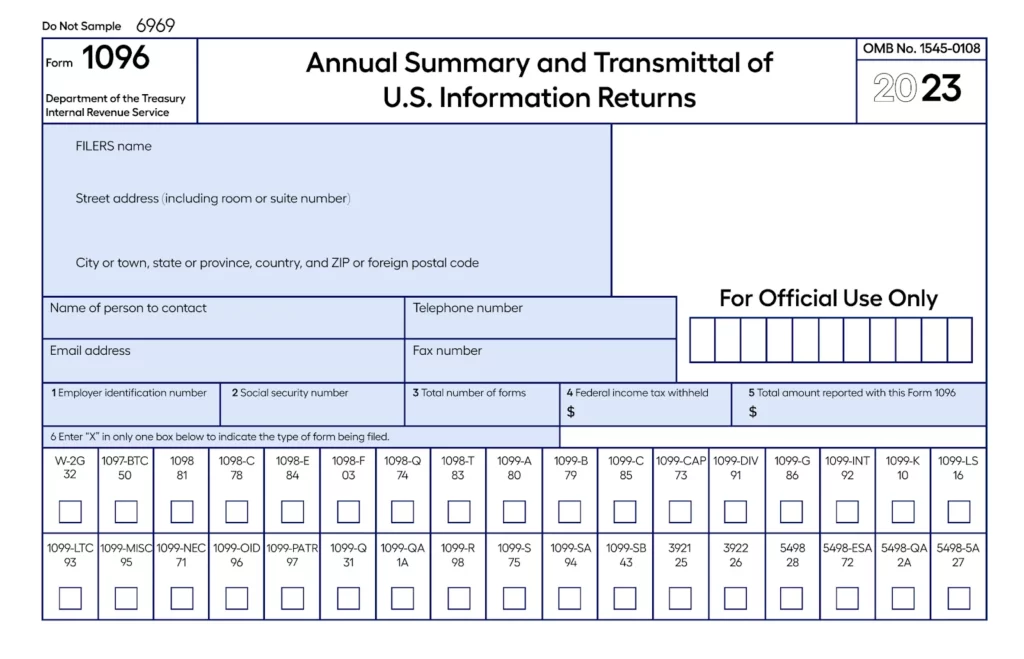
This is how a typical Form 1096 looks like. The following steps explain how to fill the form:
Step 1: Fill in the business’ returns information
Before you start filing Form 1096, you must fill in the other accompanying forms, for example, a 1099-MISC form. The data filled in these forms and the number of forms you fill out are important for completing the 1096.
Once you have filled out the rest of the forms, you will have a clear idea of the number of 1096s you must fill and submit. If you are mailing only one 1099-MISC form, you need to fill only one 1096. Likewise, you must fill out a 1096 for each form you submit to the IRS.
Step 2: Fill in the basic information at the top of the form
The boxes in the upper-left corner demand your basic information like – Filers name, address, city, state, country, and zip code. You also need to input your phone number, email address, and fax number. In the box “Name of person to contact” be sure to put the name of your business accountant or tax advisor, if necessary.
Step 3: Complete the box 1 or 2, and box 3
Box 1 requires your Employer Identification Number or EIN. Sole proprietors without an EIN can add their social security number in box 2. Be sure to fill either box 1 or 2, and not both of them. Also, the number you provide in this box must match the number you have used in the other return forms.
Box 3 asks for the number of forms you are submitting with Form 1096. If you are submitting 10 separate sets of 1099-MISC forms, you must include “10” in box 3 of Form 1096. Remember that the box asks about the number of forms, not pages. Hence, even if some of your forms have multiple pages, you only have to write the total number of forms.
Step 4: Complete boxes 4 and 5
Box 4 asks for the amount of “federal income tax withheld.” This number is based on the other return form you are filing alongside 1096. To input the right number, calculate the sum of the entire income tax withheld and mention it in the box. If you did not withhold any federal income tax, simply put “0” in box 4.
Box 5 demands the “total amount reported with this Form 1096”. Again, this amount depends on the return form you are filing alongside the 1096. If you are submitting forms 1098-T, 1099-A, or 1099-G, you can skip filling out this box. However, for other forms, you must enter the valid number corresponding to the amount reported. If the accompanying form asks for a number from more than one box, add the relevant numbers together and input the final amount in box 5.
Step 5: Complete boxes 6 and 7
Next comes box 6, which asks you to checkmark (or put an “x”) on the right entry, signifying which information return you are submitting with the 1096. This is not a multiple-choice entry, so mark only one of the options. If you have multiple forms to submit, prepare different 1096s for each of them.
Box 7 is also a checkmark option if you are submitting a 1099-MISC form with the 1096. The 1099-MISC form reports payments made by businesses to independent contractors, as this payment is reported as NEC (non-employee compensation).
Step 6: Review the form and submit
Now that you have filled out the form, it is time you reviewed all the information to ensure zero mistakes. After double-checking the data, sign, date, and mention your title at the bottom of the form.
To mail the forms, organize all the returns based on the form number, with the 1096 on the top. If you are filing 1099-MISC forms, the IRS recommends mailing them separately with their 1096s. Before sending the mail, create multiple copies for your safekeeping in case you are asked to present them during an audit. Always mail the original documents to the IRS address in a flat mailer before the due date.
Tips for US employers For Filing Form 1096
As explained above, Form 1096 is fairly easy to understand and fill out. However, there are a few things you can do to ensure peace of mind while filing all taxes.
Consider filing electronically
Filing your taxes electronically streamlines your tax return processes, helps in faster processing of returns, and saves a lot of time. Furthermore, by choosing to file electronically, you will not have to deal with Form 1096, as this form is only necessary for returns sent via mail.
E-filing is a blessing for small businesses to file tax returns without errors and safely manage the paperwork. You will experience a hassle-free process in filing the taxes without the need to write all information manually. Furthermore, if you partner with a USA EOR service provider for your tax filing, you can focus on growing your business and other important concerns.
Invest in a payroll software
A payroll or accounting software makes your life easier by handling all the tax filing processes and providing quick access to important information. These tools can also help you collaborate better with an advisor, business accountant, or tax professional. Some payroll solutions also allow you to file taxes from their gateway and submit information directly to the IRS website.
The need for these automated tools is incredibly urgent. As per Multiplier’s Global hiring gap report, 53% of companies cite international tax compliance as a top payroll challenge, making manual processing a major operational risk.
Collaborate with experts
Working with a tax professional is always worth it, whether you are filing via mail or electronically. Business taxes are difficult to maintain and might get complicated. A CPA or an enrolled tax agent can help you understand the best practices in tax filing, the restrictions that apply to you, and other specifics you must know.
Furthermore, the professional can be a helping hand in understanding the various aspects of all the forms you must fill out. They will guide you on calculating the right taxes, filing them in the relevant sections, and staying punctual to avoid penalties.
Multiplier – The safest way to manage global HR?
An important aspect of global payroll is the classification of your employees and contractors. Form 1096 applies for various purposes, including contractor payments and other business-related expenses. To comply with U.S. labor laws, you must correctly classify your workforce and payments. Improper classification can lead to hefty fines, penalties, and litigations.
Understandably, recording various employee-related taxes is very complicated, especially if you have a global workforce. The best solution to streamline this process and align with all regulations is collaborating with an EOR provider.
This complexity is a massive hurdle for growing businesses. In fact, as per Multiplier’s Global hiring gap report, 37% of companies point to compliance complexity as the absolute biggest source of friction in global hiring
Multiplier’s EOR solution provides a ready-to-use legal infrastructure to maintain your global workforce. This includes generating a legal employment contract, onboarding global employees within minutes, recording and paying the relevant taxes on time, maintaining an invoice for your contractors, and much more. Multiplier helps you remain fully compliant with local and global labor laws and avoid hefty penalties that impact your operations and outlook.
Connect with us to grow beyond borders confidently.